We are so glad to welcome you as a Node Operator for Trusted Smart Chain. By securing your node(s), you have taken the first step toward becoming part of a global blockchain ecosystem built on transparency, innovation, and collaboration.
This email contains a copy of your Node purchase receipt. Please scroll towards the bottom of this email to see the details of your purchase.
You are now officially a member of our exclusive community, The Trusted Society — a group united by camaraderie, education, and the shared vision of building something extraordinary together. This is more than technology; it is about being part of a movement where your participation directly contributes to the growth and strength of the network.
This email will guide you step by step on how to set up your node, activate your accounts, and engage with the community so you can start earning rewards and participating fully from day one.
Important: Please use the same email address across all platforms (purchase, hosting, wallet, dashboards) for everything to function properly.
The Purpose Behind Each Step
- Hosting ensures your node is online 24/7 so it can communicate with the blockchain and begin earning rewards immediately once provisioned.
- Wallet Setup secures your daily digital rewards and gives you full control over storage, transfers, and access.
- Community Participation connects you with ongoing training, live updates, and education through The Trusted Society — ensuring you are always informed and engaged.
- Mobile AppSet Up- All functions will go through this wallet. Please set this up for full functionality
Step 1: Host Your Node (Required to Earn Rewards)
Hosting Disclaimer: You may use any hosting provider of your choice. The options outlined below are provided for convenience, but you are not obligated to use Go Fluiid or any specific service. Your only requirement is to ensure your nodes remain hosted on a reliable server that meets the technical specifications.
Option 1: Community-Favored Hosting — Go Fluiid
Most members use Go Fluiid because it is built specifically for TSC and requires no technical setup.
- Pre-configured for Trust Nodes
- No server setup required
- Exclusive pricing: $1.95/month per node
Hosting Provider: https://gofluiid.com
Steps:
- Go to the Go Fluiid website and click "Get Started."
- Enter your information.
- Validate your email.
- Select the number of nodes to host.
- Set up monthly or annual payment.
After completing payment: Your nodes should appear on your Go Fluiid dashboard. If you set up hosting before your nodes are provisioned and see 0 nodes, do not worry — this is normal. Please allow up to 24 hours for your nodes to come online. Once they are provisioned on the blockchain, Go Fluiid will automatically update and your nodes will start operating as soon as they are on chain.
For questions: support@gofluiid.
Option 2: Self-Hosting or Alternative Providers
If you prefer, you may host your nodes independently.
Minimum Requirements:
- Linux-based server
- 1 GB memory (or higher)
- 20 GB storage (or higher)
- Reliable, always-on internet connection
Hosting on a laptop or PC is not recommended.
Installation Steps:
- Access your server (SSH/terminal).
Run installer:
bash <(curl -s https://mainnet-tsc.sfo3.digitaloceanspaces.com/node/linux/install-trust.sh)
bash <(curl -s https://mainnet-tsc.sfo3.digitaloceanspaces.com/node/linux/install-nano.sh)
- Enter your email (same as purchase).
- Enter your activation key (found under "Licenses" in app.trustedsmartchain.com).
- Once confirmed, your node is live. Repeat for each license you own.
Option 3: Other Hosting Providers to Explore
You may also consider these popular hosting providers:
- Vultr
- Contabo
- Digital Ocean
These providers offer VPS (Virtual Private Server) hosting that meets the minimum requirements. You will need to configure your server following the self-hosting installation steps outlined in Option 2.
Timeframe Notice: It takes 24–48 hours from receiving this email for nodes to be provisioned on the blockchain. Hosting should be set up first so your nodes begin earning rewards immediately once online.
Step 2: Set Up Your Prosper Wallet (Most Important Step)
You must complete this step BEFORE setting up the Prosper Wallet on Iphone or Android (coming soon).
Your Prosper Wallet is the single most critical part of this entire process. This wallet is where all of your daily digital rewards are delivered — and your ability to access them depends on how carefully you set it up.
Unlike traditional banking, blockchain wallets are self-custodied. That means:
- Only you control access to your wallet.
- There is no "customer service recovery" for lost seed phrases.
- WARNING: If you lose your seed phrase, your assets are permanently lost. We cannot recover your seed phrase for you.
Steps to Set Up
- Go to app.prosperwallet.io
- Click Get Started.
- This is not linked to your prosperlink credentials. So you will need to create a new account.
- Create a Passcode.
- Your login password gives you access to the wallet interface.
- Your Passcode is a second layer of security required to authorize any transactions.
- Your password and passcode are separate and serve different functions.
- Write down your 12-word seed phrase exactly in order (1–12).
Password, Passcode, and Seed Phrase — What is the Difference?
- Login Password – Used to log in to your wallet.
- Can be reset using "Forgot Password" at the login screen.
- Passcode – Used to authorize transfers and transactions inside your wallet.
- Can be reset within the Prosper Wallet interface if needed.
- Seed Phrase (12 words) – The master key to your wallet.
- Cannot be reset or recovered.
- If lost, access to your wallet and its contents is permanently gone.
SEED PHRASE TEMPLATE
URL: app.prosperwallet.io
Email: _______________
Login Password: _______________
Passcode: _______________
Mobile app Password_________________
Mobile app Pin_______________________
Seed words:
| 1 | 2 |
| 3 | 4 |
| 5 | 6 |
| 7 | 8 |
| 9 | 10 |
| 11 | 12 |
Seed Phrase Education – Protecting Your Digital Assets
Your seed phrase is the most sensitive and important part of your wallet. Treat it with extreme care:
- Write it down in the exact order (1–12). The order matters.
- Never save it digitally (no screenshots, no cloud storage, no texting or emailing).
- Store it offline in a fireproof/waterproof safe or other secure location.
- Do not share it with anyone.
If your seed phrase is lost or stolen, no one can help you recover it. This is why protecting it is more important than any other step in this process.
Optional: Join the Official Telegram Community
The Telegram community portal is where you connect with other members, receive official updates, and stay safe from scams.
https://t.me/
Steps to Join:
- Follow this link
- https://t.me/
trustedsmartchainportal - Click "Tap to Verify"
- Click "Verify"
- Click "Click Here"
- (You may have to solve a Captcha)
- Click the link Safeguard provides to you inside the message.
- (Do not click the Ad Button at the bottom of its message, this will lead you to a different website.)
- Congratulations! You have joined our community!
Security Alert – Protect Yourself on Telegram
To ensure your safety, please read carefully:
- We will never message you first on Telegram.
- We do not conduct payments through Telegram.
- We will never ask you to complete a payment or provide wallet details on Telegram.
- We will never request your seed words or ask you to verify passwords.
- All official communication takes place only through our verified platforms.
The only email for payment-related communication is:
support@prosperwallet.io
THIS IS THE ONLY TELEGRAM CHANNEL WE HAVE. IF YOU ARE INVITED TO JOIN ANOTHER OUTSIDE OF THE AFFILIATE CHANNEL IT IS A SCAM.
DO NOT JOIN TRUSTED SMART CHAIN VIP ON TELEGRAM. IT IS A SCAM ACCOUNT DESIGNED TO HARM OUR LEGITIMATE TRUSTED SMART CHAIN COMMUNITY. IF YOU ARE ADDED TO THAT GROUP, REPORT, BLOCK AND DELETE.
Scam & Impersonation Disclaimer
Trusted Smart Chain (TSC) and its affiliated entities are not responsible for any loss of funds, digital assets, or personal information resulting from interactions with bad actors, impersonators, or unauthorized third parties falsely claiming to represent the TSC community.
We have been made aware of fraudulent groups, including unauthorized Telegram channels, that are impersonating Trusted Smart Chain and attempting to solicit payments, offer discounted nodes, or otherwise mislead individuals. These parties are not affiliated with TSC in any capacity.
Prosper Link LLC is the only official and contractually authorized seller of Trusted Smart Chain (TSC) node software licenses. TSC nodes are sold exclusively through Prosper Link’s official platforms and verified communication channels. TSC does not sell nodes through private messages, unofficial Telegram groups, or unauthorized third parties, nor are nodes offered at discounted rates outside of formally announced promotions.
Any transaction conducted outside of Prosper Link’s official channels is done at the individual’s own risk. We strongly encourage all community members to independently verify all communications, avoid unsolicited offers, and contact official TSC or Prosper Link support directly before sending funds or sharing sensitive information.
If someone contacts you claiming to represent us outside of these official channels, it is a scam. Please block and report them immediately.
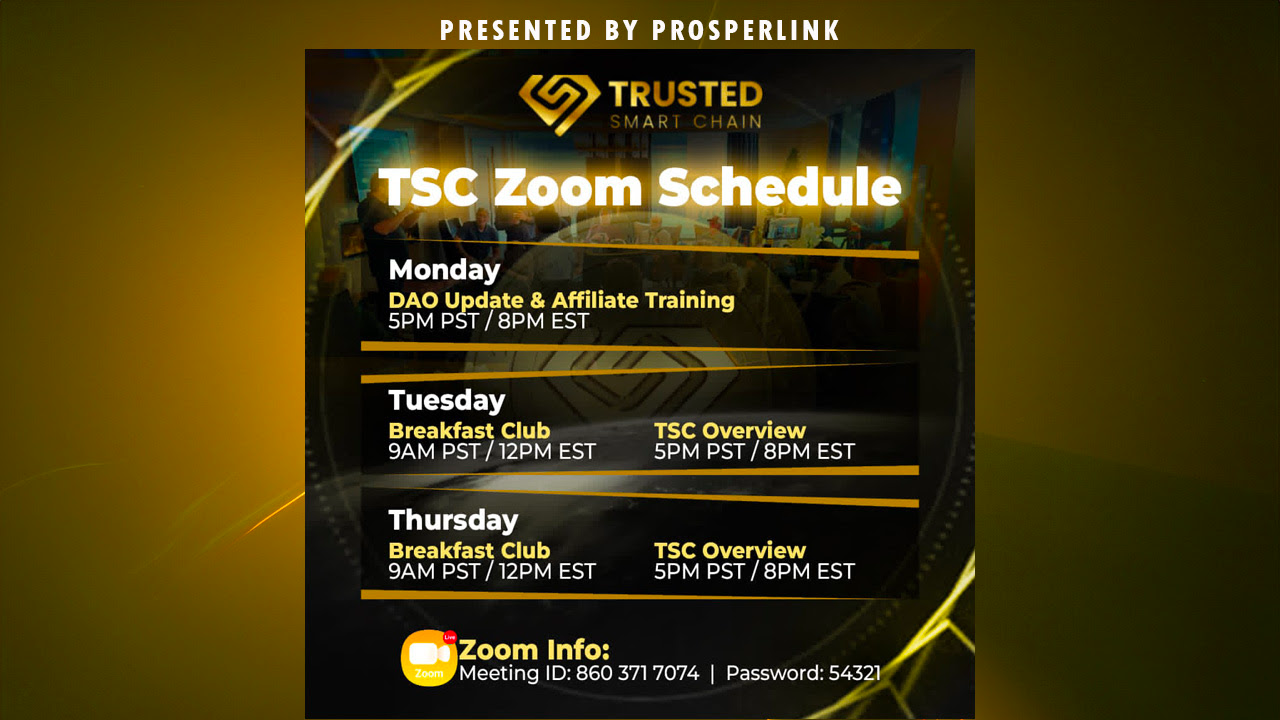
Optional: Get Involved – Weekly Community Calls
Stay connected with fellow Trusted Society members and continue your education through our weekly calls:
- Monday – Affiliate Training: 5 PM PST
- Tuesday Morning – Breakfast Club: 9 AM PST
- Tuesday Evening – TSC Overview: 5 PM PST
- Thursday Morning – Breakfast Club: 9 AM PST
- Thursday Evening – TSC Overview: 5 PM PST
(All calls use the same Zoom link, https://us02web.zoom.us/
Prosper Wallet Setup Instructions (iOS)
Step 1: Install the Prosper Wallet
Go to the app store and find Prosper Wallet 2026
Follow the on-screen prompts to install the wallet.
Once installation is complete, open the Prosper Wallet app.
Step 2: Create Your Wallet Passcode
When the wallet opens, you will be prompted to create a secure passcode.
Requirements:
Minimum 8 characters
At least 1 uppercase letter
At least 1 symbol
This passcode is used to access the wallet.
You may:
Use the same passcode as your existing Prosper Wallet
Use your login password or your current Prosper Wallet passcode
Create a brand-new passcode
Choose something secure that you will remember.
Step 3: Select “Import Wallet”
On the welcome screen, select Import Wallet.
This is required because this wallet is a mirror of your existing Prosper Wallet.
Important: You must import your existing Prosper Wallet seed phrase.
Step 4: Import Your Seed Phrase
You will now be asked to import your seed phrase.
Name your wallet
Choose a name that helps you easily identify it (example: “Main Prosper Wallet”).Enter your 12-word seed phrase
Carefully enter each word into the correct slot.
SECURITY WARNING
Never share your seed phrase with anyone
No support staff will ever ask for it
This should be done privately
Anyone with your seed phrase can access your funds
Step 5: Create Your Transaction PIN
Once the seed phrase is entered:
If the phrase is incorrect, the app will notify you
If correct, you will proceed to the next screen
You will now create a transaction PIN:
Choose either a 4-digit or 6-digit PIN
This PIN is required anytime you send a transaction.
Important Difference to Remember
Wallet Passcode: Opens the wallet
Transaction PIN: Authorizes sending transactions
Both are required. Make sure you remember your PIN.
Step 6: Validation
After completing:
Wallet passcode
Seed phrase import
Transaction PIN
You will be asked to re-enter your password to confirm setup.
Step 7: Access Requests (Optional Settings)
You will be prompted to enable:
Notifications (optional)
Face ID (optional)
If you enable Face ID:
You can access the wallet without typing your passcode each time
If you do not enable Face ID:
You will need to enter your passcode every time you open the wallet
Both options are completely optional.
Step 8: Wallet Access Complete
Once validated, you will be taken to the wallet home screen.
You now have:
Full access to your wallet
Access to balances and transactions
A complete mirror of your existing Prosper Wallet
Your wallet setup is complete
Quick Guide: Websites You will Use (and what each is for)
- app.prosperlink.co
Your member dashboard: buy nodes, view announcements, and access/join the affiliate program. - app.trustedsmartchain.com
Community portal: find your license/activation keys and track node rewards ("Active Nodes"). - gofluiid.com
Popular third-party hosting used by many members (pre-configured for TSC; discounted pricing). You can use any hosting service you choose. Go Fluiid is not required. - app.prosperwallet.io/login
Prosper Wallet: where your digital rewards are received (set up wallet + seed words).
Was this article helpful?
That’s Great!
Thank you for your feedback
Sorry! We couldn't be helpful
Thank you for your feedback
Feedback sent
We appreciate your effort and will try to fix the article